API Overview
Gateway API is a complex API, solving a complex problem. The designers of Gateway API have done our best to try to meet the dual demands of configuration flexibility and high usability.
In order to do that, we've needed to create a number of new ideas and concepts, while still echoing ideas from the rest of Kubernetes. This page goes through the most important things to learn when you are starting out in Gateway API.
On this page, important words and concepts that are used in other places in the Gateway API docs are written in bold text, as are other points that are really important to remember.
Roles and personas
There are 3 primary roles in Gateway API, as described in roles and personas:
- Ian (he/him): Infrastructure Provider
- Chihiro (they/them): Cluster Operator
- Ana (she/her): Application Developer
Resource model
Note
Gateway API resources are in the gateway.networking.k8s.io API group as
Custom Resource Definitions (CRDs). Unqualified resource names below will
implicitly be in this API group.
There are three main types of objects in our resource model:
GatewayClass defines a set of gateways with a common configuration and behavior.
Gateway requests a point where traffic can be translated to Services within the cluster.
Routes describe how traffic arriving via the Gateway maps to the Services.
GatewayClass
Standard Channel since v0.5.0
The GatewayClass resource is GA and has been part of the Standard Channel since
v0.5.0. For more information on release channels, refer to our versioning
guide.
GatewayClass defines a set of Gateways that share a common configuration and behaviour. Each GatewayClass will be handled by a single controller, although controllers may handle more than one GatewayClass.
GatewayClass is a cluster-scoped resource. There must be at least one GatewayClass defined in order to be able to have functional Gateways. A controller that implements Gateway API does so by providing an associated GatewayClass resource that the user can reference from their Gateway(s).
This is similar to
IngressClass
for Ingress and
StorageClass for
PersistentVolumes. In Ingress v1beta1, the closest analog to GatewayClass is the
ingress-class annotation, and in IngressV1, the closest analog is the
IngressClass object.
Gateway
Standard Channel since v0.5.0
The Gateway resource is GA and has been part of the Standard Channel since
v0.5.0. For more information on release channels, refer to our versioning
guide.
A Gateway describes how traffic can be translated to Services within the cluster. That is, it defines a request for a way to translate traffic from somewhere that does not know about Kubernetes to somewhere that does. For example, traffic sent to a Kubernetes Service by a cloud load balancer, an in-cluster proxy, or an external hardware load balancer. While many use cases have client traffic originating “outside” the cluster, this is not a requirement.
It defines a request for a specific load balancer config that implements the GatewayClass’ configuration and behaviour contract. The resource may be created by an operator directly, or may be created by a controller handling a GatewayClass.
As the Gateway spec captures user intent, it may not contain a complete specification for all attributes in the spec. For example, the user may omit fields such as addresses, TLS settings. This allows the controller managing the GatewayClass to provide these settings for the user, resulting in a more portable spec. This behaviour will be made clear using the GatewayClass Status object.
Gateway objects bind one or more Addresses to one or more Listeners.
Addresses are how the Gateway is reached, and are usually IP addresses, although some implementations (particularly ones that route traffic via an AWS load balancer) use domain names instead.
Listeners describe how the Gateway should listen for traffic, and have a port, a protocol, and other protocol-specific details.
Listeners that are not distinct are in conflict, and Gateway API includes instructions for what happens in various conflict cases. What makes Listeners distinct is a bit complicated and is discussed in the Distinctiveness section (link).
A critical reason for the requirement that Listeners are distinct is that traffic flowing through a Gateway must only match a single Listener. Any particular traffic must only be able to be assigned to a single Listener, and once that Listener is chosen, the traffic must be routable via an attached, protocol-specific Route, or it must be dropped by the Gateway.
The most important outcome here is that traffic can't fail to be routed by one Listener, then fall back to another for further processing. For more information on this, see the Traffic Matching page.
However, for the Route -> Gateway relationship, the most important thing is that Routes attach to one or more Listeners on the the Gateway.
Distinctiveness
For the property that traffic must only match a single Listener to be true, then Listeners must be distinct.
Gateway API defines distinctiveness according to the protocol selected on the Listener. For any given protocol, some fields (particularly port) MAY be shared, but exactly what that means depends on the protocol.
Listeners that are not distinct are Conflicted, and may not be present on the same Gateway.
If they are, then the entire Gateway is invalid and will not reach Accepted status.
(Feel free to skip these exact definitions below if you are just starting out, they are very important, but you can learn by doing as well).
Distinctiveness rules, in increasing order of complexity
TCPandUDPListeners are distinct only on the combination ofprotocolandport. So, two Listeners that listen on port53, but where one hasprotocolset toTCPand the otherUDPare distinct, but two Listeners that both haveprotocolTCP, andport22are not distinct, and are thus Conflicted.TLSListeners are distinct based on the combination of the fieldsprotocol,port, andhostname. In this case, thehostnamedescribes the Server Name Indicator (SNI) used as part of the TLS handshake, which can be used as a routing discriminator. Note that, in this case the TLS config in thetlsstanza is not relevant, as that allows you to specify whether or not the connection is terminated, which is not relevant in this case - because only the SNI, which applies in either terminated or not terminated cases, is defined.HTTPListeners are distinct via the combination of the fieldsprotocol,port,hostname. Two Listeners that both exposeHTTPon port80, with differenthostnamefields, are distinct.HTTPSListeners are distinct via the combination of the fieldsprotocol,port,hostname, but there is an additional requirement. If the protocol isHTTPS, then you must have a Secret reference that points to a Kubernetes Secret of typekubernetes.io/tls. Listeners with differenthostnamesmay point to different Secrets, but we don't mandate that (since a single certificate can support many hostnames). So, two Listeners that exposeHTTPSon port443are distinct if they have differenthostnamefields.
Route Types
Route resources define protocol-specific rules for mapping requests from a Gateway to Kubernetes Services.
As of v1, four Route resource types are included with the API. Custom Route types that are implementation-specific are encouraged for other protocols. New route types may be added to the API in future.
HTTPRoute
Standard Channel since v0.5.0
The HTTPRoute resource is GA and has been part of the Standard Channel since
v0.5.0. For more information on release channels, refer to our versioning
guide.
HTTPRoute is for multiplexing HTTP or terminated HTTPS connections. It's intended for use in cases where you want to inspect the HTTP stream and use HTTP request data for either routing or modification, for example using HTTP Headers for routing, or modifying them in-flight.
TLSRoute
Standard Channel since v1.5.0
The TLSRoute resource is GA and has been part of the Standard Channel since
v1.5.0. For more information on release channels, refer to our versioning
guide.
TLSRoute is for multiplexing TLS connections, discriminated via SNI. It's intended
for where you want to route based on TLS metadata, and are not interested in properties
of the higher-level protocols like HTTP. When using a Passthrough TLS listener, the
encrypted byte stream of the connection is proxied directly to the destination backend,
which is then responsible for decrypting the stream. When using a Terminate TLS
listener, encryption is terminated at the gateway.
TCPRoute and UDPRoute
Experimental Channel since v0.3.0
The TCPRoute and UDPRoute resources are Alpha and have been part of the
Experimental Channel since v0.3.0. For more information on release
channels, refer to our versioning guide.
TCPRoute (and UDPRoute) are intended for use for mapping one or more ports to a single backend. In this case, there is no discriminator you can use to choose different backends on the same port, so each TCPRoute really needs a different port on the listener (in general, anyway). You can terminate TLS in which case the unencrypted byte stream is passed through to the backend. You can choose to not terminate TLS, in which case the encrypted byte stream is passed through to the backend.
GRPCRoute
Standard Channel since v1.1.0
The GRPCRoute resource is GA and has been part of the Standard Channel since
v1.1.0. For more information on release channels, refer to our versioning
guide.
GRPCRoute is for idiomatically routing gRPC traffic. Gateways supporting GRPCRoute are required to support HTTP/2 without an initial upgrade from HTTP/1, so gRPC traffic is guaranteed to flow properly.
Route summary table
One of the most important use cases for Gateway API is to allow Ana the Application Developer and her peers to be able to multiplex Routes onto the same Listener. Each Route type has different information that can be used to accomplish this, and these sets of information are called Routing Discriminators.
More precisely, Routing discriminators are the information that can be used to allow multiple Routes to share a single port on a Listener.
This table from the API Overview page summarizes the various Route types included in Gateway API, with their Routing Discriminators.
| Object | Protocol | OSI Layer | Routing Discriminator | Listener TLS Support | Backend TLS Support | Purpose |
|---|---|---|---|---|---|---|
| HTTPRoute | HTTP or HTTPS | Layer 7 | Anything in the HTTP Protocol | Terminated only | Via BackendTLSPolicy | HTTP and HTTPS Routing |
| TLSRoute | TLS | Somewhere between layer 4 and 7 | SNI or other TLS properties | Passthrough or Terminated | Via BackendTLSPolicy (Extended, when Terminated) | Routing of TLS protocols including HTTPS where inspection of the HTTP stream is not required. |
| GRPCRoute | HTTP or HTTPS | Layer 7 | Anything in the gRPC Protocol | Terminated only | Via BackendTLSPolicy (Extended) | gRPC Routing over HTTP/2 and HTTP/2 cleartext |
| TCPRoute | TCP | Layer 4 | None | Passthrough or Terminated | Via BackendTLSPolicy (Extended, when Terminated) | Allows for forwarding of a TCP stream from the Listener to the Backends |
| UDPRoute | UDP | Layer 4 | None | None | None | Allows for forwarding of a UDP stream from the Listener to the Backends. |
Notably, because of their lack of other routing discriminators, TCPRoute and UDPRoute can only have a single Route attached to any particular Listener.
Attaching Routes to Gateways
When a Route attaches to a Gateway, it represents configuration that is applied on the Gateway that configures the underlying load balancer or proxy. How and which Routes attach to Gateways is controlled by the resources themselves. Route and Gateway resources have built-in controls to permit or constrain how they are attached. Together with Kubernetes RBAC, these allow organizations to enforce policies for how Routes are exposed and on which Gateways.
There is a lot of flexibility in how Routes can attach to Gateways to achieve different organizational policies and scopes of responsibility. These are different relationships that Gateways and Routes can have:
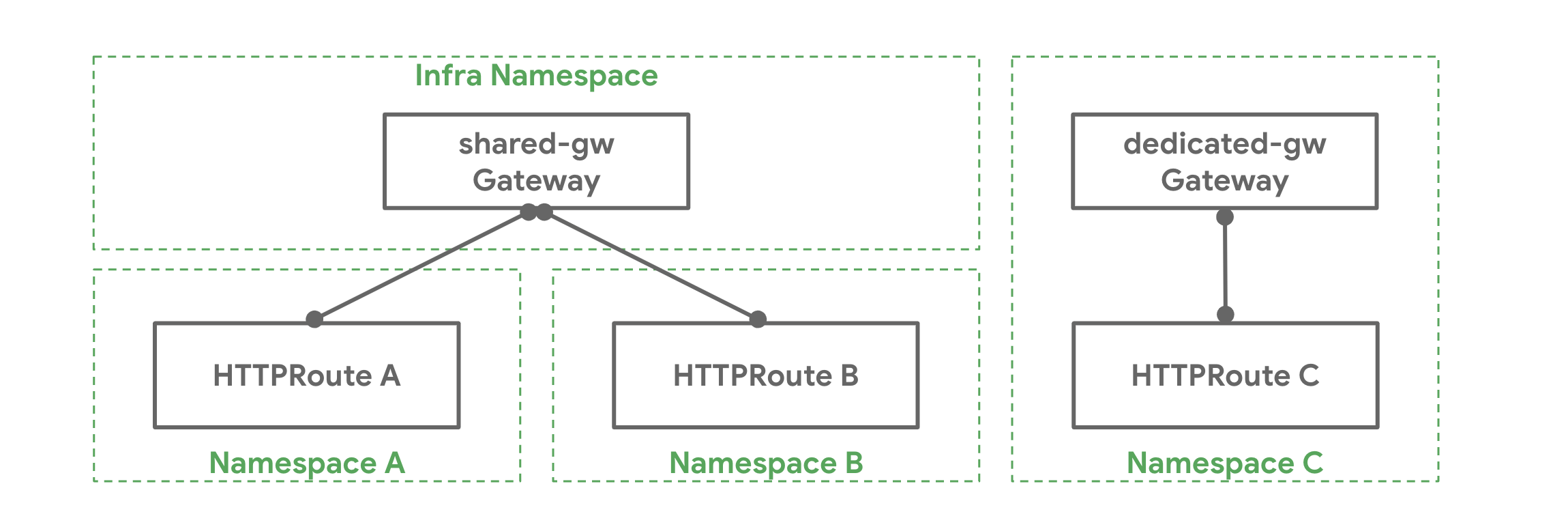
- One-to-one - A Gateway and Route may be deployed and used by a single owner and have a one-to-one relationship.
- One-to-many - A Gateway can have many Routes bound to it that are owned by different teams from across different Namespaces.
- Many-to-one - Routes can also be bound to more than one Gateway, allowing a single Route to control application exposure simultaneously across different IPs, load balancers, or networks.
For a Route to attach to a Listener, two things have to be true:
- The Route must reference a Gateway (or one of its Listeners via a
sectionName) in itsparentRefsstanza. All Routes must contain aparentRefsstanza to be a Gateway API compliant Route object. - The Listener must accept the Route's attachment. There are many ways for Listeners to describe the shape of what Routes should attach to a given Listener, and some attachments require agreement between the Listener and the Route about protocol-specific details (for example, matching hostnames between a Listener and a HTTPRoute).
The Route side of this is intended to ensure that, at all times, control over where an application is exposed is in the hands of Ana, the Application Developer. Chihiro, the Cluster Admin and Gateway owner, can limit what shapes Routes that can attach to their Gateway can take (via their Kind or their namespace),but they can't force Ana to expose her application. The final decision, and control of the Route object, is always Ana's.
The Listener side is intended to ensure that Ana's Route produces a valid configuration, and also matches Chihiro's requirements (if any) about what traffic is allowed to be exposed on that Gateway.
Example
Chihiro has deployed a Gateway shared-gw in the infra Namespace to be
used by different application teams for exposing their applications outside
the cluster. Teams A and B (in Namespaces A and B respectively) attach
their Routes to this Gateway. They are unaware of each other and as long as
their Route rules do not conflict with each other they can continue operating
in isolation. Team C has special networking needs (perhaps performance,
security, or criticality) and they need a dedicated Gateway to proxy their
application to the outside world. Team C deploys their own Gateway
dedicated-gw in the C Namespace that can only be used by apps in the C
Namespace.
How it Works
As said above, the following is required for a Route to be attached to a Gateway:
- The Route needs an entry in its
parentRefsfield referencing the Gateway. - At least one listener on the Gateway needs to allow this attachment.
Referencing Gateways
Extended Support Feature: HTTPRouteParentRefPort
This feature is part of extended support. For more information on support levels, refer to our conformance guide.
Extended Feature
The Port field described below is an Extended feature, and so is optional for implementations to support.
The feature name for this feature is HTTPRouteParentRefPort, and you should be able to find out if your implementation supports it either in the implementation's GatewayClass (under status.supportedFeatures), or on one of the implementation comparison pages (like the v1.4 comparison.)
A Route can reference a Gateway by specifying the namespace (optional if the
Route and the Gateway are in the same namespace) and name of the Gateway in
a parentRef. By default, a Route will attach to all listeners of a Gateway,
however it can restrict the selection to a subset of listeners using the
following fields in parentRef:
- SectionName: When
sectionNameis set, the Route selects the listener with the specified name. - Port: When
portis set, the Route selects all listeners listening on the specified port and with protocol compatible with this kind of Route.
When multiple fields in parentRef are set, the Route selects listeners that
satisfy all conditions specified in those fields. For example, when both
sectionName and port are set, the Route selects listeners with the specified
name AND listening on the specified port.
Restricting Route Attachment
Each Gateway listener can restrict which Routes can be attached with the following mechanisms:
- Hostname: When the
hostnamefield on a listener is set, attached Routes that specify ahostnamesfield must have at least one overlapping value. - Namespaces: The
allowedRoutes.namespacesfield on a listener can be used to restrict where Routes may be attached from. Thenamespaces.fromfield supports the following values:Sameis the default option. Only Routes in the same namespace as this Gateway may be attached.Allwill allow Routes from all Namespaces to be attached.Selectormeans that Routes from a subset of Namespaces selected by a Namespace label selector may be attached to this Gateway. WhenSelectoris used, thenamespaces.selectorfield must be used to specify label selectors. This field is not supported withAllorSame.
- Kinds: The
allowedRoutes.kindsfield on a listener can be used to restrict the kinds of Routes that may be attached.
If none of the above are specified, a Gateway listener will trust Routes attached from the same namespace that support the listener protocol.
Further Gateway - Route attachment examples
The following my-route Route wants to attach to the foo-gateway in the
gateway-api-example-ns1 and will not attach to any other Gateways. Note that
foo-gateway is in a different Namespace. The foo-gateway must allow
attachment from HTTPRoutes in the namespace gateway-api-example-ns2.
apiVersion: gateway.networking.k8s.io/v1
kind: HTTPRoute
metadata:
  name: my-route
  namespace: gateway-api-example-ns2
spec:
  parentRefs:
  - kind: Gateway
    name: foo-gateway
    namespace: gateway-api-example-ns1
  rules:
  - backendRefs:
    - name: foo-svc
      port: 8080
This foo-gateway allows the my-route HTTPRoute to attach.
apiVersion: gateway.networking.k8s.io/v1
kind: Gateway
metadata:
  name: foo-gateway
  namespace: gateway-api-example-ns1
spec:
  gatewayClassName: foo-lb
  listeners:
  - name: prod-web
    port: 80
    protocol: HTTP
    allowedRoutes:
      kinds:
      - kind: HTTPRoute
      namespaces:
        from: Selector
        selector:
          matchLabels:
            # This label is added automatically as of K8s 1.22
            # to all namespaces
            kubernetes.io/metadata.name: gateway-api-example-ns2
For a more permissive example, the below Gateway will allow all HTTPRoute resources to attach from Namespaces with the "expose-apps: true" label.
apiVersion: gateway.networking.k8s.io/v1
kind: Gateway
metadata:
  name: prod-gateway
  namespace: gateway-api-example-ns1
spec:
  gatewayClassName: foo-lb
  listeners:
  - name: prod-web
    port: 80
    protocol: HTTP
    allowedRoutes:
      kinds:
      - kind: HTTPRoute
      namespaces:
        from: Selector
        selector:
          matchLabels:
            expose-apps: "true"
Combined types
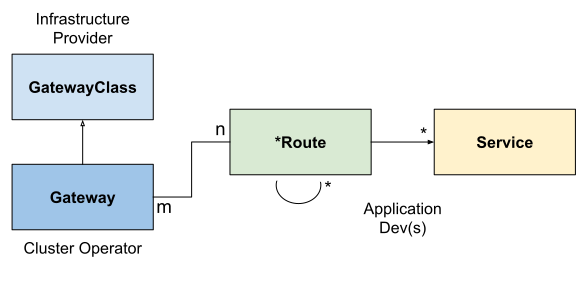
The combination of GatewayClass, Gateway, xRoute and Service(s)
defines an implementable load-balancer. The diagram below illustrates the
relationships between the different resources:
Request flow
A typical north/south API request flow for a gateway implemented using a reverse proxy is:
- A client makes a request to http://foo.example.com.
- DNS resolves the name to a
Gatewayaddress. - The reverse proxy receives the request on a
Listenerand uses the Host header to match anHTTPRoute. - Optionally, the reverse proxy can perform request header and/or path
matching based on
matchrules of theHTTPRoute. - Optionally, the reverse proxy can modify the request, i.e. add/remove
headers, based on
filterrules of theHTTPRoute. - Lastly, the reverse proxy forwards the request to one or more objects, i.e.
Service, in the cluster based onbackendRefsrules of theHTTPRoute.
TLS Configuration
TLS is configured on Gateway listeners, and may be referred to across namespaces.
Please refer to the TLS details guide for a deep dive on TLS.
Attaching Routes to Services
When using Gateway API to configure a service mesh, the Route will attach directly to a Service, representing configuration meant to be applied to any traffic directed to the Service. How and which Routes attach to a given Service is controlled by the Routes themselves (working with Kubernetes RBAC), as covered in the GAMMA routing documentation.
Extension points
A number of extension points are provided in the API to provide flexibility in addressing the large number of use-cases that cannot be addressed by a general purpose API.
Here is a summary of extension points in the API:
- BackendRefs: This extension point should be used for forwarding traffic to network endpoints other than core Kubernetes Service resource. Examples include an S3 bucket, Lambda function, a file-server, etc.
- HTTPRouteFilter: This API type in HTTPRoute provides a way to hook into the request/response lifecycle of an HTTP request.
- Custom Routes: If none of the above extensions points suffice for a use case, Implementers can choose to create custom Route resources for protocols that are not currently supported in the API. Custom Route types need to share the same fields that core Route types do. These are contained within CommonRouteSpec and RouteStatus.
Whenever you are using an extension point without any prior art, please let the community know. As we learn more about usage of extension points, we would like to find the common denominators and promote the features to core/extended API conformance.